VRChat Review Australia November 2026: Virtual Love or Just Scams?
i0
Step into a new world of limitless possibilities with VRChat, an immersive virtual reality experience that brings people together from all over the globe. All about VRChat in Australia.
By Chris Pleines· Reading time: 19 min· Last update:
4.0very good
VRChat is a virtual reality social platform for meeting people through custom avatars
Ideal for individuals who are interested in virtual-reality technology and want to find dates with like-minded people
Those who enjoy socializing and playing games with friends and other users
Perfect for artists, musicians, and animators who want to showcase their work and collaborate with others in a virtual environment
…and not for
VRChat may not be suitable for individuals who are not familiar with or comfortable with innovative technology
Singles seeking casual encounters and sexual pleasures
Not suitable for minors as VRChat may contain offensive and inappropriate content
Not for people seeking affairs
VRChat pros & cons
Allows users to socialize and possibly get a date with others in a virtual reality environment
Available on multiple platforms, including PC, VR headsets, and mobile devices
Provides a platform for individuals with development skills, such as 3D modeling and animation
Requires a relatively powerful computer or VR headset to run, which can be a barrier to entry for some users
Has limited features for desktop version
User interface can be difficult to use, especially for new users
What VRChat really costs in Australia
VRChat is free of charge.
VRChat costs last updated on Oct 29, 2026
Payment options in Australia
Credit CardPayPal
VRChat costs screenshot
prices
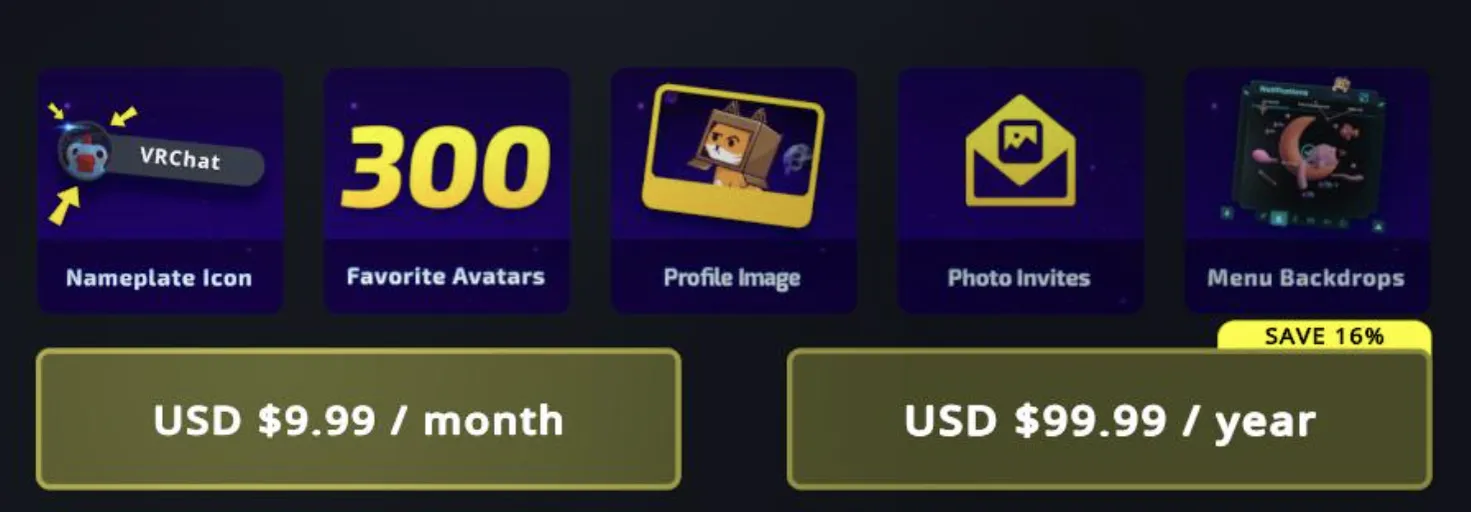
VRChat is a free-to-play virtual reality social game, but players can purchase optional in-game items, such as avatar skins and accessories. Additionally, VRChat offers a "VRChat Plus" subscription that provides access to additional features and benefits, such as the ability to use custom avatars, host private rooms, and use particle effects.
Overall, VRChat is a relatively affordable virtual reality experience, with the option to purchase additional features and benefits for those who want to enhance their experience. Subscription is available in Steam and Oculus Quest Store.
Exclusively on DatingScout: online member numbers for dating services are usually far off, so we estimate how many people are really on VRChat from traffic data and interest, updated monthly, with history.
VRChat is a virtual-reality platform where members, primarily in their late 30s, create accounts to participate in the immersive experience. Despite being dominated by male members, the platform caters to individuals seeking friendship or casual dates with like-minded individuals. With a knowledgeable user base in recent technological advancements, VRChat offers a unique opportunity for members to connect and engage in a dynamic virtual-reality environment. Whether seeking social interactions or exploring new technologies, VRChat provides a platform for members to fulfill their interests.
2,830-35%
Rough estimate of active members
50,000
Weekly active members in Australia
15,000
Members in Australia
3.7
App Store rating in Australia
3.5
Google Play rating worldwide
4k
4k
4k
3k
3k
3k
JunJulAugSepOctNov
Estimated active members, last 6 months
Gender
Women
Men
20%
80%
Women
Men
Gender
Age of members
18-24
25-34
35-44
45-54
55+
45%
18-24
26%
25-34
14%
35-44
8%
45-54
8%
55+
Age of members
Where VRChat is most popular in Australia
Strongest regions
Northern Territory100%
Queensland99%
South Australia90%
lowerhigher
Last data update: November 2026
How does VRChat work?
01
VR social platform with user-created virtual worlds
02
Avatars and content can be custom made or explored
Adjust your privacy settings according to your preferences
Profile pictures are visible to everybody for free
The VRChat app
No mobile app
Designed for VR headsets
Players can access VRChat through the web browser
Members without VR devices can use a generic mouse and keyboard
Limited features for desktop view
VRChat does not have a standalone app for mobile devices such as smartphones or tablets. VRChat is a virtual-reality game designed for use with VR headsets, such as the Oculus Rift, HTC Vive, Valve Index on the PC, or the Oculus Quest standalone headset. However, players can access VRChat through the web browser on their mobile device to view content and interact with other players. But full VR gameplay is not possible without a VR headset.
Design & usability
VRChat's design is intuitive and user-friendly, making it accessible for players of all ages and skill levels. The virtual world is designed with a colourful aesthetic that is both immersive and enjoyable to explore. The controls are smooth and responsive, allowing players to easily move around the world and interact with other players and objects.
The user interface is well-designed and organized, making it easy to access the various features and functions of the game. Additionally, VRChat offers many customisation options, allowing players to personalise their avatars and environments to suit their preferences. Overall, VRChat's design and usability make it a fun and engaging virtual reality experience for players.
Special features
Check out VRChat's special features here:
Finding people 1
Discover WorldsFree
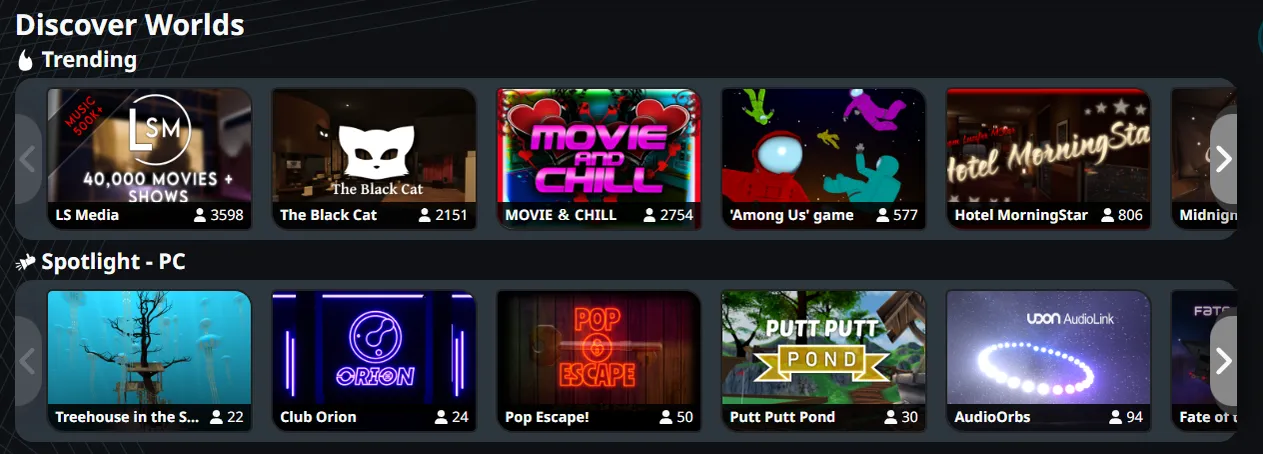
Discover Worlds is a special feature in VRChat that provides users with a curated selection of virtual environments and experiences to explore. It showcases some of the best and most popular worlds created by VRChat users and allows users to easily browse and discover new and interesting places to visit.
Showing interest 3
My WorldsFree
My Worlds is a feature in VRChat that allows users to keep track of their favorite virtual environments and experiences. In My Worlds, users can save a list of the virtual environments that they have visited and liked, and easily return to them in the future. Users can add worlds to their My Worlds list by visiting them and clicking on the "Add to My Worlds" button.
Photo InvitesFree
Photo Invites in VRChat is a feature that allows users to send virtual invitations to other users to visit a specific world or location within a world. The invitations are sent in the form of a photo that includes a screenshot of the world or location, along with a message or description.
300 Favorite Avatar SlotsPaid
The 300 Favorite Avatar Slots in VRChat is a feature that allows users to save up to 300 of their favorite avatars for quick and easy access. These saved avatars can be quickly selected from a special menu, rather than having to search for them each time the user logs into VRChat.
Profile and visibility 1
Parallax Menu BackdropsFree
Parallax Menu Backdrops in VRChat refer to the background images or animations that are displayed in the VRChat menu. These backdrops are designed to create a visually appealing and immersive experience for users while they are using the menu and accessing different features of VRChat.
Community and events 1
GroupsFree
Users can see their owned and joined groups in this tab. They can search groups via shortcodes, names, or urls.
Safety and privacy 3
Two-Factor AuthentificationFree
Two-factor authentication (2FA) in VRChat is a security feature that adds an extra layer of protection to a player's account. In addition to a password, 2FA requires the player to enter a one-time code generated by a mobile app or sent via text message before accessing their account. This helps prevent unauthorized access to the account, even if someone has obtained the password. Enabling 2FA helps ensure that the player's personal information and virtual assets remain secure.
Increased TrustFree
Increased Trust in VRChat is a designation given to users who have demonstrated a high level of trustworthiness within the VRChat community.
Mute ProfileFree
The "Mute Profile" feature in VRChat allows users to silence specific players in the virtual world. When a user mutes someone's profile, they will no longer be able to hear that person's voice, nor see any visual speech gestures (such as the avatar's lips moving) or particle effects associated with that person's voice. This can be helpful in situations where a user is being disruptive or annoying, or if they are using inappropriate language or behavior.
Premium and payment 3
VRChat PlusPaid
VRChat Plus is a paid subscription service offered by VRChat Inc. It provides users with additional features and benefits beyond the standard VRChat experience.
Host Private RoomsPaid
"Host Private Rooms" is a feature available to VRChat Pro subscribers. This feature allows players to create and host their own private rooms in VRChat, where they can invite others to join and interact with them.
Particle EffectsPaid
"Use Particle Effects" is a feature available to VRChat Pro subscribers. This feature allows players to use particle effects in their virtual environments, such as smoke, fire, rain, and other special effects. Particle effects can enhance the look and feel of a virtual environment, making it more immersive and visually appealing.
Other extras 7
VRChat Documentation HubFree
The VRChat Documentation Hub is a collection of resources and information about VRChat, including tutorials, guides, and information about VRChat's features and functionality.
Creator CompanionFree
The VRChat Creator Companion is a suite of tools designed to help users create and manage content on VRChat. It includes a range of features and functionalities that simplify the process of creating and uploading custom content to the platform, including avatars, animations, environments, and more.
VRChat Merch
VRChat Merch is a range of official merchandise, such as clothing and accessories, that is inspired by and related to VRChat. The merchandise is designed and produced by VRChat Inc. and is available for purchase on various online platforms, such as VRChat's official website or online marketplaces like Redbubble or Teespring. Some of the items included in VRChat Merch include t-shirts, hoodies, stickers, and more.
AvatarsFree
In VRChat, an Avatar is a 3D character model that represents a player. Players can customize their Avatars by choosing from a wide selection of user-generated content or by uploading their own models. Avatars can interact with other players in real-time, including voice chat, emotes, and animations, creating a rich and immersive virtual experience.
Social Media ShareFree
Social media share is a feature in VRChat that allows players to share their virtual experiences with friends on social media platforms such as Twitter, Steam, Facebook, and Discord.
LanguagesFree
Language preferences is a feature in VRChat that allows players to select their preferred language for the user interface, chat, and in-game content. This allows players from different countries and regions to comfortably use the platform in their native language, improving the overall user experience.
GesturesFree
In VRChat, gestures refer to physical movements and actions performed by a user's avatar to express emotions, movements, or reactions. These gestures can be performed using VR controllers or keyboard inputs and are often used to complement voice or text communication for a more immersive social experience.
Final results
4.0
“VRChat is a highly engaging and entertaining virtual-reality social game. With its intuitive design, user-friendly interface, and wide range of customization options, VRChat offers a fun and immersive experience for players of all ages and skill levels.”
Chris Pleines, Founder of DatingScout and Author of the book "Online Dating for Dummies"
VRChat is a virtual-reality social platform where players can interact with one another in real-time, including voice chat, emotes, and animations. Players can also explore a vast library of user-generated content, including virtual environments, games, and social spaces.
What is VRChat?
VRChat is a virtual-reality social platform where players can interact with one another in real-time, including voice chat, emotes, and animations. Players can also explore a vast library of user-generated content, including virtual environments, games, and social spaces.
Is VRChat free?
VRChat is free to download and play, but some features and virtual items may require a purchase.
What is 2FA in VRChat?
2FA stands for two-factor authentication, which is an extra layer of security for your VRChat account. It requires you to enter a one-time code generated by a mobile app or sent via text message in addition to your password.
What are some popular social spaces in VRChat?
Some popular social spaces in VRChat include The Amphitheater, The Red Light District, The Lobby, and The Home. These spaces offer a variety of activities and events and are a great place to meet new friends.
What are some best practices for VRChat etiquette?
Some best practices for VRChat etiquette include being respectful to other players, avoiding harassment and spam, and following the community rules.
USABILITY
Do I need a VR headset to play VRChat?
No, you do not need a VR headset to play VRChat. You can play it on a PC using a keyboard and mouse or with a game controller.
How do I create my own Avatar in VRChat?
You can create your own Avatar in VRChat by selecting from many user-generated content options or by uploading your own 3D models.
How do I add friends in VRChat?
You can add friends in VRChat by searching for their username and sending a friend request. You can also join social spaces and meet new friends through mutual interests.
How do I access my account settings in VRChat?
You can access your account settings in VRChat by clicking on the gear icon in the main menu. From there, you can manage your account information, privacy settings, and other preferences.
How do I report a player in VRChat?
If you encounter a player who is breaking VRChat's community rules, you can report them by clicking on the player's username and selecting the report option.
Can I play VRChat with friends who don't have VR headsets?
Yes, you can play VRChat with friends who don't have VR headsets. Non-VR players can use a keyboard and mouse or game controller to participate in VRChat's virtual environments and games.
How do I upload my own content to VRChat?
You can upload your own content to VRChat by using the VRChat SDK and following the submission guidelines.
How do I participate in events in VRChat?
You can participate in events in VRChat by joining social spaces and looking for announcements and invitations from other players.
COST
How much is VRChat Plus?
VRChat offers a "VRChat Plus" subscription that provides access to additional features such as the ability to use custom avatars, use particle effects, and host private rooms. The cost of VRChat Plus varies depending on the length of the subscription. Check the prices here.
Can I try VRChat Pro before I buy it?
VRChat does not offer a free trial for VRChat Pro, but you can purchase it for a month and see if you like the additional features and benefits.
You did not find your question? Ask us!
Thank you for your question. We will answer it as soon as possible.
Security
Does VRChat sell your data?
No, VRChat does not sell your data.
Was VRChat hacked in the past?
No, VRChat was never hacked.
How accurately does VRChat track your location?
VRChat does not track your location.
Do your VRChat profile pictures or profile information appear in Google Search Results?
No, your VRChat photos and personal information will not appear in Google Search Results.
Who can view your pictures on VRChat?
All VRChat users can view your pictures.
Is your phone number required for signing up at VRChat?
No, you can sign up at VRChat without a phone number.
Can you erase your personal data on VRChat?
Yes, VRChat provides an option for users to erase their data.
Why can you trust us?
We have been testing and publishing online dating reviews for over 17 years
We have carefully reviewed over 3,580 dating services
Our dating site reviews and results are objective and independent in contrast to many other comparison sites
We update our reviews every month based on new site/app offerings and feedback from our readers
We are the Author of the Book "Online Dating for Dummies" - read more on our About Us page
Our Dating Experts are constantly cited by press and TV outlets, find out more here
Founder of DatingScout and Author of the book "Online Dating for Dummies"
Chris founded DatingScout 17 years ago, and today he is one of the leading Online Dating Experts. He is the author of the book "Online Dating for Dummies" and the author of the Internet's largest online dating study analyzing 20 Million Profile Pictures with artificial intelligence. Chris Pleines holds a master degree in media science and appeared in numerous television interviews and publications to give expert advice as well as tips about online dating.